Enhancements to Upsell Forecast Report (Dynamic)
The following enhancements have been made to the Upsell Forecast Report (Dynamic):
-
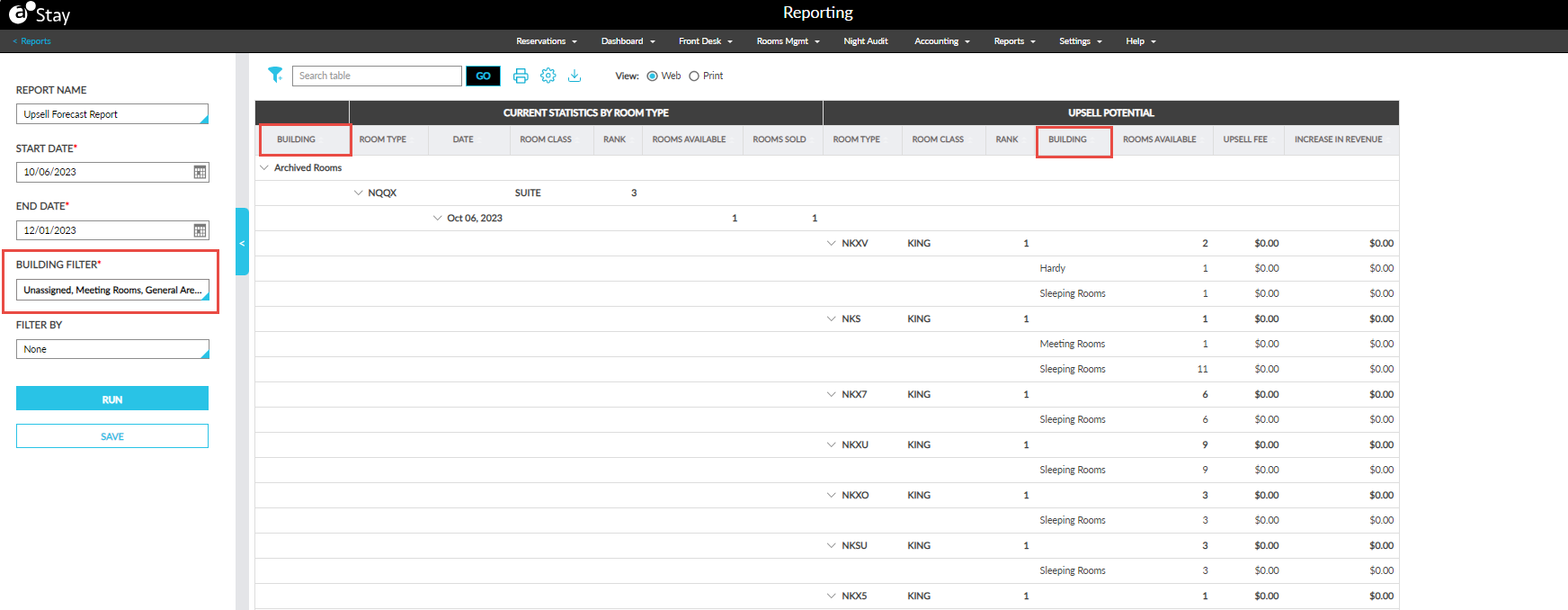
A new column, Building, has been added before the Room Type column in the Current Statistics by Room Type section. This column displays the name of the building associated with the room type.
-
When there are multiple buildings associated with the room type, the buildings are displayed in alphabetical order.
-
The rooms sold for the building and the upsell details for all higher ranked room types in each building are displayed under this column.
-
This column is displayed in an accordion. The accordion is expanded by default and displays values for all columns. When collapsed, only the data for this column is displayed.
-
-
A new column, Building, has been added next to the Rank column in the Upsell Potential section. This column displays the name of the building associated with the room type.
-
When there are multiple buildings associated with the room type, the buildings are displayed in alphabetical order.
-
The Rooms Available column displays the sum of rooms available in each building for each available room type.
-
The Upsell Fee column displays the average of the upsell fee against the room type.
-
The Increase in Revenue column displays the sum of revenue increase available in each building for each available room type.
-
-
An accordion has been added to the Room Type column in the Current Statistics by Room Type section. This accordion is expanded by default. When collapsed, data is displayed for the Building, Room Type, Room Class, and Rank columns.
-
An accordion has been added to the Room Type column in the Upsell Potential section. This accordion is expanded by default. When collapsed, data is displayed for the Room Type, Room Class, Rank, Rooms Available, Upsell Fee, and Increase in Revenue columns.
-
A new report generation parameter, Building Filter, has been added below the End Date field. This is a mandatory multi-select drop-down list that displays all the buildings available at the property. The records in the report are filtered and displayed based on the buildings selected.